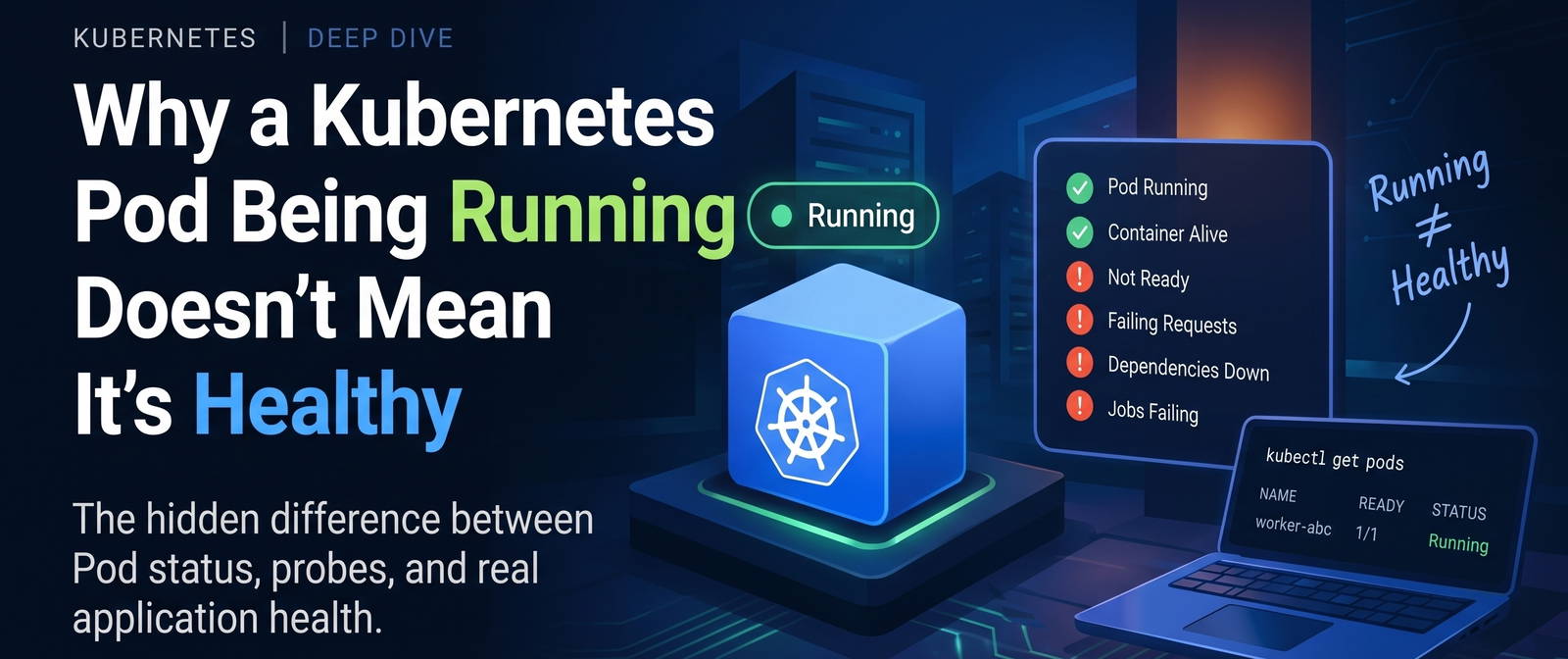


Why a Kubernetes Pod Being Running Doesn't Mean It's Healthy
A Pod can be Running while your application is broken, unable to receive traffic, or quietly failing every job.
One of the easiest Kubernetes mistakes to make is also one of the most dangerous:
kubectl get pods
You see:
NAME                          READY   STATUS    RESTARTS
worker-7f9    1/1     Running   0
And you think:
"The Pod is healthy."
Not necessarily.
Running is not a health check.
It's a statement about Pod lifecycle.
And understanding that difference completely changes how you debug Kubernetes.
The first mental model
A Kubernetes Pod has several different questions that can be answered independently:
Is the Pod running?
        ↓
Is the container ready?
        ↓
Can it receive traffic?
        ↓
Is the application actually functioning?
        ↓
Can it successfully perform its real work?
These are not the same question.
Think about a normal server.
A process can be alive:
PID 1234
while the application is:
- stuck
- unable to connect to a dependency
- returning errors
- unable to process requests
- consuming jobs and failing them
Kubernetes is no different.
Running means something very specific
Kubernetes Pod phases include:
Pending
Running
Succeeded
Failed
Unknown
When a Pod is Running, Kubernetes knows that the Pod has been scheduled and that its containers have started.
It does not automatically mean:
✓ application is healthy
✓ application can serve traffic
✓ dependencies are working
✓ requests are succeeding
✓ background jobs are succeeding
That's the first distinction to remember:
Running describes lifecycle. Healthy describes behavior.
So how does Kubernetes know whether a container is healthy?
This is where probes enter the picture.
Kubernetes gives us three primary probe types:
Startup Probe
Readiness Probe
Liveness Probe
They answer three different questions.
1. Startup Probe
"Has the application finished starting?"
Imagine your application takes 40 seconds to initialize.
During those 40 seconds:
container = alive
application = still starting
If you immediately run a liveness check, Kubernetes might conclude:
"This application is broken."
And restart it.
Then it starts again.
Then the probe fails again.
Then Kubernetes restarts it again.
You can accidentally create:
start
 ↓
probe fails
 ↓
restart
 ↓
start
 ↓
probe fails
 ↓
restart
A startup probe protects slow-starting applications from that situation.
Example:
startupProbe:
  httpGet:
    path: /health/live
    port: 8080
  periodSeconds: 2
  failureThreshold: 15
With these settings, Kubernetes gives the application roughly:
2 × 15 = 30 seconds
to successfully start before treating startup as failed.
2. Readiness Probe
This is one of the most important concepts in production Kubernetes.
Readiness asks:
"Should this Pod receive work right now?"
Suppose you have:
Service
   ↓
Pod A
Pod B
Pod C
If Pod B fails its readiness probe:
Pod A → Ready
Pod B → NotReady
Pod C → Ready
Kubernetes can stop sending Service traffic to Pod B.
But here's the important part:
A failed readiness probe does not restart the container.
That's intentional.
Maybe the application is temporarily unable to serve traffic but is expected to recover.
For example:
database temporarily unavailable
        ↓
readiness fails
        ↓
Pod stays alive
        ↓
Pod removed from traffic
        ↓
database recovers
        ↓
readiness succeeds
        ↓
Pod receives traffic again
That's very different from liveness.
3. Liveness Probe
Liveness asks:
"Is this application so broken that restarting the container is appropriate?"
For example, suppose your application enters a deadlock:
process = alive
HTTP server = technically running
application = permanently stuck
A liveness probe can detect that condition.
If it repeatedly fails:
liveness fails
      ↓
Kubernetes restarts container
      ↓
application starts fresh
That's useful.
But it can also be dangerous.
The dangerous liveness probe
Imagine your liveness endpoint checks:
database
Redis
external API
third-party service
Now Redis goes down.
Your application itself is perfectly capable of running, but your liveness probe says:
Redis unavailable
      ↓
liveness fails
      ↓
restart application
      ↓
application starts
      ↓
Redis unavailable
      ↓
liveness fails
      ↓
restart
You've just turned a dependency outage into a restart storm.
That's why liveness should generally answer:
"Is this process/application locally stuck or irrecoverably broken?"
rather than:
"Are all of my dependencies healthy?"
The three probes in one picture
Remember this:
                 APPLICATION
                     │
          ┌──────────┼──────────┐
          ↓          ↓          ↓
       STARTUP    READINESS   LIVENESS
          │          │          │
          ↓          ↓          ↓
     "Can you      "Should     "Should I
      start?"       receive      restart
                    work?"      you?"
Or even shorter:
Startup   → Can you start?
Readiness → Can you work?
Liveness  → Should I restart you?
That's the mental model.
But there's another trap
Here's where real production systems become interesting.
Imagine a worker that consumes jobs from a queue.
Its architecture is:
Queue
  ↓
Worker
  ↓
Browser
  ↓
Result
Now imagine the browser inside the worker becomes unhealthy.
You might create a readiness check:
browser unhealthy
       ↓
readiness = false
Sounds correct.
But what happens to the worker?
If the worker is still consuming jobs:
Queue
 ↓
Worker
 ↓
Browser ❌
the worker may continue receiving jobs even though it cannot successfully process them.
Now you've created a worse situation:
job arrives
   ↓
worker receives it
   ↓
browser unhealthy
   ↓
job fails
   ↓
next job
   ↓
fails
   ↓
next job
The Pod can be:
STATUS = Running
while the actual business operation is failing.
This is exactly why readiness needs to be designed around how the workload actually receives work, not simply around whether a health endpoint returns 200. Your infrastructure notes flag this as an area requiring careful review.
The subtle lesson: Readiness doesn't stop everything
This is especially important for background workers.
For a normal HTTP application:
Load Balancer
     ↓
Service
     ↓
Readiness
     ↓
Pod
Readiness has a very direct effect.
But for a worker:
Pub/Sub / Queue
      ↓
Worker
the application may pull work directly.
There may be no Kubernetes Service sitting between the queue and the worker.
Therefore:
readiness = false
doesn't automatically mean:
stop consuming jobs
That's an application-level behavior.
This is one of the biggest differences between:
"Not receiving HTTP traffic"
and
"Not receiving background work."
Kubernetes health is layered
A better mental model is:
Layer 1
Pod lifecycle
      ↓
Running?

Layer 2
Container health
      ↓
Startup / Liveness

Layer 3
Traffic readiness
      ↓
Ready?

Layer 4
Application health
      ↓
Can requests actually succeed?

Layer 5
Business health
      ↓
Are jobs actually completing successfully?
And that last layer is often forgotten.
A Pod can look perfectly healthy and still be failing
Consider:
NAME                    READY   STATUS
worker-abc              1/1     Running
Everything looks good.
But your metrics say:
jobs_received = 10,000
jobs_completed = 0
jobs_failed = 10,000
From Kubernetes' perspective:
Pod = Running
Container = alive
From your business perspective:
System = broken
Both can be true at the same time.
That's why production observability cannot rely on:
kubectl get pods
alone.
What should you actually monitor?
For a production workload, I'd think in layers.
Kubernetes signals
Pod phase
Container restarts
OOMKilled
CPU throttling
Memory usage
Pending Pods
Scheduling failures
Probe signals
Startup failures
Readiness failures
Liveness failures
Time spent NotReady
Application signals
Request success rate
Error rate
Latency
Dependency failures
Queue consumption
Business signals
Jobs completed
Jobs failed
Jobs expired
Queue wait time
Success rate
Customer-visible failures
The further down you go, the closer you get to the question:
"Is the system actually doing what users need?"
A practical debugging flow
When someone says:
"The Pod is unhealthy."
Don't immediately restart it.
Ask:
Step 1: Is it running?
kubectl get pod <pod>
Step 2: What are the conditions?
kubectl describe pod <pod>
Look at:
Conditions
Events
Restart Count
Last State
Reason
Step 3: Which probe is failing?
Look for:
Startup probe
Readiness probe
Liveness probe
Step 4: Test the endpoint yourself
For example:
curl localhost:8080/health/live
curl localhost:8080/health/ready
Step 5: Check application logs
kubectl logs <pod>
Step 6: Check actual business behavior
For a worker:
Are jobs being consumed?
Are jobs succeeding?
Are they failing?
Are they expiring?
That's where you stop debugging Kubernetes and start debugging the actual system.
A useful production rule
Here's the rule I now keep in my head:
Don't design health checks around what is easy to check. Design them around what Kubernetes needs to know.
For example:
Readiness
Good:
Can this Pod safely receive work?
Potentially dangerous:
Is every dependency in the entire system healthy?
Liveness
Good:
Is this process/application fundamentally stuck?
Potentially dangerous:
Is every external dependency healthy?
Business monitoring
Good:
Are jobs actually succeeding?
This belongs in metrics and alerting, not necessarily in liveness.
The final mental model
Next time you see:
STATUS: Running
don't translate it to:
"Everything is healthy."
Translate it to:
"The Pod is alive according to Kubernetes' lifecycle state. Now I need to determine whether it is ready, responsive, and actually doing useful work."
That's a much safer production mindset.
The 10-second revision
If you remember nothing else:
Running
  ≠
Healthy
Startup   → Can you start?
Readiness → Can you receive work?
Liveness  → Should you be restarted?
Business  → Are you actually succeeding?
And the most important production lesson:
Kubernetes can tell you that your process is alive. Your application metrics need to tell you whether your system is actually working.
What I learned from this
The interesting part of Kubernetes isn't memorizing:
Pod
Deployment
Service
Probe
It's understanding the failure semantics between them.
A readiness failure doesn't restart a container.
A liveness failure does.
A Pod being Running doesn't make it Ready.
A Pod being Ready doesn't guarantee that a business operation succeeds.
And for background workers, being NotReady doesn't necessarily mean the worker has stopped consuming work.
That's where Kubernetes knowledge starts becoming production engineering.